
Simple Audiobook Player +
mdmtMusic & Audio
4.7197.00 Reviews
- Version
- 1.8.3
- Installs
- 10.00K
- Age Rating
- Everyone
Screenshots
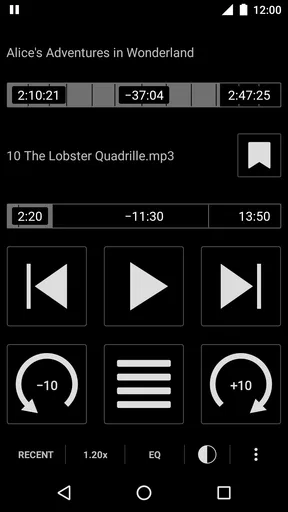
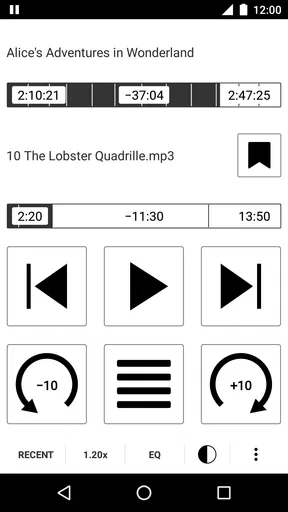
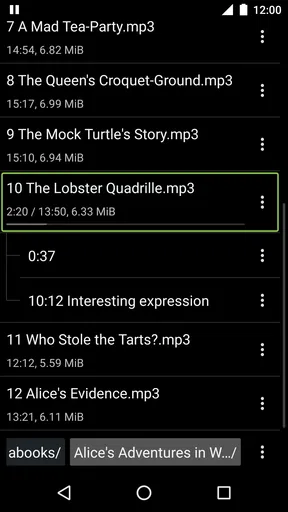
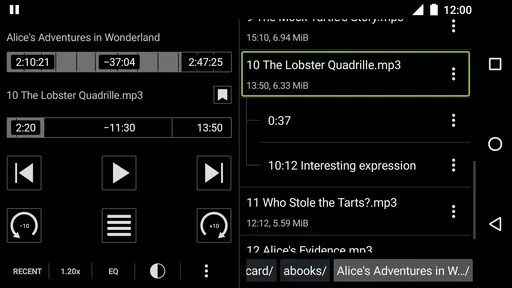
Our Review of Simple Audiobook Player +
 Analysis by Appyee
I like audiobook apps most when they make it easy to get back into a story without turning listening into another project. Simple Audiobook Player + is aimed at that kind of use: it is a paid audio app from mdmt, and its focus is playing audiobooks rather than bundling in a larger listening service. That distinction matters if you already have audio files and want a dedicated player, but it also means the app suits a different routine from services built around browsing and buying books.
A focused player, not a book storefront
The current version is 1.8.3, and the app has been available since July 30, 2016. Those details make it a long-running, established player rather than a newly launched experiment, though they do not by themselves tell me how often its internals have changed. I would judge it by the listening tools it offers and how comfortably they fit a personal library, not by assuming that a version number signals a particular redesign.
At $2.49, it is a one-time purchase rather than a subscription-style audiobook catalog. That can be appealing if you already own audiobooks or get them from sources you use independently; you are paying for playback, not for a rotating selection of titles. If you want one app to recommend books, manage purchases, and keep a cloud library in sync, a major audiobook service may be a better match. Simple Audiobook Player + is more compelling when the books are already yours and the player is the missing piece.
What the version history means in practice
The confirmed release date and current version give useful context, but I would not treat them as proof of specific feature changes. The controls described here—such as sleep timing, bookmarks, playback-speed adjustment, and library organization—are the practical reasons to consider the app. A future change could make those routines smoother, but I would wait to see what actually ships before expecting a particular improvement.
For someone already using it, the main question is whether its existing playback habits suit the way they listen. If you rely on a sleep timer, bookmarks, or a preferred speed, those are the routines worth checking after any app update, rather than assuming that a newer version will automatically change your library or listening position. I would also keep your audiobook files organized outside the player: a clear folder structure makes it easier to recover your collection or move to another player if your needs change.
Simplicity at Its Best
First off, the name says it all—Simple Audiobook Player + is all about keeping things straightforward and easy to use. No frills, no unnecessary clutter, just pure audiobook bliss. The user interface is as intuitive as it gets, making it perfect for everyone, whether you're a tech wizard or just someone who wants to hit play and relax.
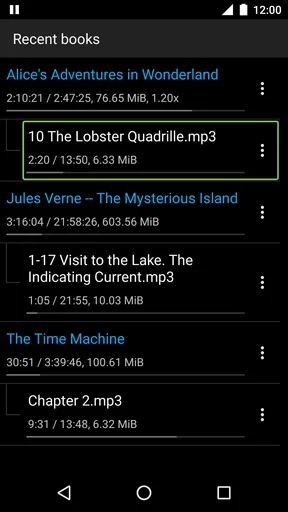
The design is clean and minimalistic, which I totally appreciate. You're not bombarded with ads or pop-ups, and navigating through your library is a breeze. The developers have clearly focused on delivering a seamless experience, and it shows. Finding your way around the app is akin to flipping through the pages of a well-loved book—effortless and enjoyable.
Features That Make a Difference
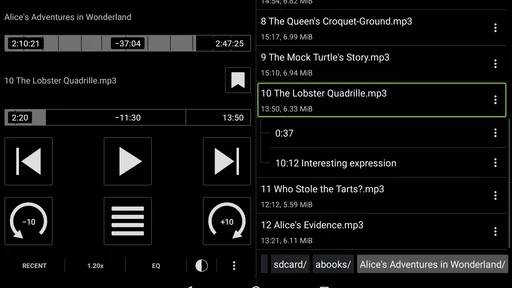
Now, let's get into the nitty-gritty of what Simple Audiobook Player + offers. One feature I particularly like is the sleep timer. If you're like me and love falling asleep to a good story, this feature is a game-changer. You can set it to stop after a certain time or at the end of a chapter, ensuring you don't lose your place in the narrative when you drift off.
The bookmarking feature is another highlight. It's perfect for those moments when life interrupts your listening. You can easily mark your spot and pick up right where you left off without any hassle. Plus, the app supports a wide range of audiobook formats, including mp3, m4a, and m4b, giving you the flexibility to listen to just about anything.
Customization and Control
Let’s talk about customization because who doesn’t love a bit of personal touch? You can adjust playback speed, which is fantastic for those who like to speed through the story or take it slow and savor each word. The equalizer settings allow you to tweak the sound to your preference, ensuring every tale sounds just right.
The app also lets you organize your library with ease. You can create playlists, sort by various criteria, and even use the search function to find exactly what you're in the mood for. It's all about putting you in control of your listening experience.
Choosing it for a real listening routine
A practical way to decide is to think about where your books come from. If your collection consists of files in supported formats, a dedicated player can make listening feel less dependent on a particular store or subscription. If your books live inside a service’s account and cannot be brought into a separate player, this app is unlikely to replace that service. The key trade-off is ownership and flexibility on one side, versus an integrated catalog and account-based convenience on the other.
For a commute, I would set the book and playback speed before leaving, then use a bookmark whenever I need to stop unexpectedly. That small habit is more reliable than trying to remember a scene or timestamp later. At home, the sleep timer is useful for listening in bed; choosing the chapter-end option makes sense when a clean stopping point matters more than a precise cutoff. For a long drive, I would avoid fiddling with library sorting once underway and prepare the next title beforehand.
Small choices that prevent listening headaches
File organization can make a bigger difference than it first appears. I would keep each audiobook’s files together and name them in reading order, especially when a book is split into several tracks. That reduces the chance of selecting the wrong part from a general file list and makes a handoff to another player easier. With a chapter-based format such as m4b, the listening experience may be more naturally divided than with a single long recording, while ordinary MP3 files can be arranged as separate tracks; the best setup depends on how the files themselves were prepared.
Playback speed is worth adjusting gradually rather than jumping straight to a much faster setting. A modest increase can make familiar narration feel more efficient, but a dense nonfiction passage or a new character-heavy novel may become harder to follow. I would switch back for complicated sections instead of treating one speed as the correct setting for every book. The equalizer is similarly best used as a light correction: a small adjustment can help narration sound clearer on a particular pair of headphones, while aggressive changes may make voices less natural.
Bookmarks are most useful when they record more than an emergency pause. I would place one before a chapter I want to revisit, or at the start of a useful passage in a nonfiction audiobook, then use the playback position for ordinary continuous listening. This creates a simple distinction between “where I am” and “where I may want to return.” It is a low-effort workflow that helps when a book is interrupted over several days without turning the app into a complicated note-taking system.
Where it may fall short
A simple player is not automatically the best choice for every listener. If you want personalized recommendations, a built-in bookstore, or a broad catalog available immediately after signing in, a full audiobook platform will feel more convenient. Likewise, someone who prefers music, podcasts, and audiobooks together in one media app may not want a separate player solely for books. The focused approach is a strength for people with local files, but a limitation for people who want discovery and purchasing handled in the same place.
There is also a practical difference between supporting common file types and making every collection effortless. Files can still be poorly named, split in an inconvenient order, or stored in folders that are hard to browse. A player can help with playback and organization, but it cannot fix a badly assembled audiobook. Before paying, I would check that the way you obtain and store your books fits a file-based workflow, and that you are comfortable keeping those files organized yourself.
Accessibility is a meaningful part of the experience, particularly for listeners who use screen readers, but it is still sensible to test the actions that matter most in your own setup: finding a title, starting playback, adjusting speed, and saving a bookmark. A feature can be present while a person’s preferred device controls or habits differ. If accessibility is essential to your daily use, checking those core steps early is more useful than assuming every interaction will work exactly as it does in another audio app.
Performance and Accessibility
Performance-wise, Simple Audiobook Player + is smooth and reliable. I've experienced zero lag or crashes, which is a huge plus. Whether you're on a long road trip or just commuting to work, the app holds up, providing uninterrupted storytelling magic.
Accessibility is another strength. The app is designed to be used with screen readers, making it an inclusive choice for visually impaired users. It's evident that the developers have put thought into making this app accessible to everyone, enhancing its appeal across a diverse user base.
How I would judge whether it is still the right fit
The app has a 4.7 average from around 1.6 thousand ratings, with over 10 thousand installs. That is encouraging context for a small, focused audiobook tool, but popularity cannot tell you whether its workflow matches your library. I would use the trial period of my own decision-making—before settling into a large collection—to test a short book, try a bookmark, adjust speed, and see whether the library remains easy to navigate after adding several titles.
It is rated for Everyone, which speaks to its general content suitability rather than guaranteeing that every audiobook a listener imports is suitable for every age. The contents depend on the books themselves. For families, I would keep that distinction in mind and choose age-appropriate recordings rather than relying on the player’s rating as a label for the library.
For existing users, the most useful thing to watch in future releases is whether the everyday basics remain dependable: playback resumes where expected, bookmarks are easy to reach, and files remain straightforward to find. I would welcome refinements that preserve the app’s focused character, but I would not choose it based on hoped-for features. Its value is in the tools it already provides for listening to a personal collection.
Final Thoughts
In a world filled with apps trying to do too much, Simple Audiobook Player + stands out by doing exactly what it promises—delivering a simple and effective way to enjoy audiobooks. It's not about flashy features or overwhelming options; it's about getting the job done right.
So, if you're on the hunt for a reliable, user-friendly audiobook player that doesn’t complicate things, this app is worth a download. It’s a little gem that makes listening to audiobooks a joy, and honestly, what more could you ask for?
Whether you're a long-time audiobook aficionado or just starting your journey, give this app a try. You might just find it becoming your go-to companion for all those stories waiting to be heard.
Verdict
Strengths of Simple Audiobook Player +
- User-friendly interface with intuitive controls.
- Supports a wide range of audiobook formats.
- Customizable playback speed options.
- Bookmarking feature for easy navigation.
- Offline playback without data usage.
Limitations of Simple Audiobook Player +
- Limited free version features.
- Occasional ads in the free version.
- No built-in audiobook store.
- Lacks advanced sound equalizer options.
- Interface design is somewhat outdated.
Similar Picks in This Category
View All
YouTube Music
Google LLC4.4

Samsung Music
Samsung Electronics Co., Ltd.3.8

Spotify: Music and Podcasts
Spotify AB4.3

JioSaavn - Music & Podcasts
Saavn Media Limited4.3

Lark Player:Music Player & MP3
Lark Player Studio - Music, MP3 & Video Player4.6

StarMaker: Sing Karaoke Songs
SKYWORK AI PTE. LTD.4.3
Frequently Asked Questions
What features does Simple Audiobook Player + offer?
Simple Audiobook Player + provides a user-friendly interface designed for seamless audiobook playback. It supports various audio formats, bookmarks, adjustable playback speed, and sleep timer. The app also allows for easy navigation through chapters, making it convenient for users to find their place quickly. Its minimalistic design ensures an intuitive experience.
Is Simple Audiobook Player + compatible with all audiobook formats?
Simple Audiobook Player + supports a wide range of audio formats, including MP3, M4B, and OGG. However, it's always a good idea to check the specific format of your audiobooks before downloading the app to ensure compatibility. The app's versatility with formats makes it a popular choice for audiobook enthusiasts.
Does Simple Audiobook Player + offer offline playback?
Yes, Simple Audiobook Player + offers offline playback, allowing users to listen to their audiobooks without an internet connection. This feature is particularly useful for those who travel frequently or have limited data plans. Users must download their audiobooks to the device beforehand to utilize this feature effectively.
Are there any in-app purchases or advertisements in Simple Audiobook Player +?
Simple Audiobook Player + is typically free of advertisements, providing a clean and uninterrupted listening experience. However, there might be in-app purchases available for additional features or premium support. It's always advisable to check the app details for any updates regarding pricing and additional features.
How does Simple Audiobook Player + handle large audiobook files?
Simple Audiobook Player + is designed to efficiently manage large audiobook files, offering smooth playback and easy navigation. The app allows users to create bookmarks and resume playback from where they left off, regardless of the file size. This functionality ensures that listeners have a hassle-free experience even with lengthy audiobooks.
